
Most B2B marketing teams are flying blind when it comes to understanding what actually drives revenue. Leads come in from multiple sources, nurture sequences run in the background, sales reps send follow-ups, and somehow a deal closes. The question nobody can confidently answer is: which of those touchpoints actually mattered?
That is the problem multi-touch attribution is designed to solve. And when built correctly inside HubSpot, it transforms how marketing and sales teams understand performance, allocate budget, and justify their decisions to leadership.
As per the Marketing LTB, companies that switch from single-touch to multi-touch attribution see an average 22% increase in budget efficiency. That stat alone should prompt every B2B revenue team to take a serious look at their current attribution setup.
This blog walks through how to build a practical multi-touch attribution model inside HubSpot, how to avoid common mistakes, and how to turn attribution data into better business decisions.
Why Single-Touch Attribution No Longer Works?
Single-touch attribution gives 100% credit to the particular touchpoint a prospect interacted with. For example, first-touch attribution gives the credit to the first channel a prospect ever interacted with, while last-touch attribution credits the final touchpoint before conversion.
The problem is that neither reflects how modern buyers actually make decisions.
In the modern B2B customer cycle, a prospect might discover your brand through organic search, download a whitepaper, attend a webinar, receive three email sequences, interact with a sales rep on LinkedIn, and then convert via a product demo. First-touch says the organic blog post did everything. Last-touch says the demo did everything. Neither is true.
Multi-touch attribution solves this problem by distributing credit across multiple interactions throughout the customer journey. This provides a far more realistic picture of marketing influence and revenue contribution.
What is the Multi-Touch Attribution Model?
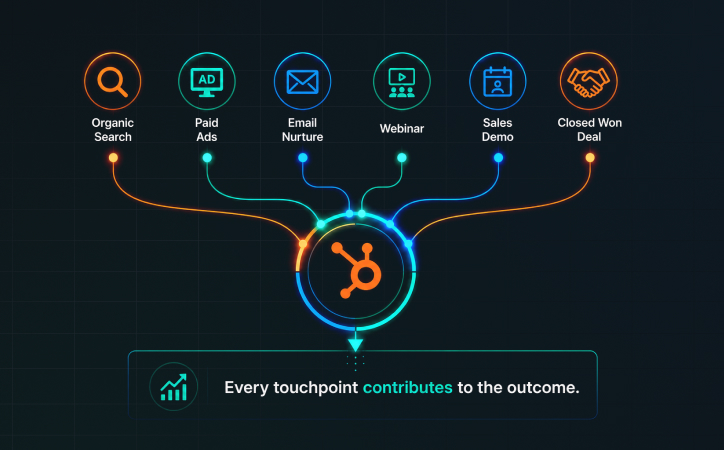
The Multi-Touch Attribution (MTA) model is a marketing analytics methodology that assigns fractional credit to different touchpoints that contributed to a customer’s journey to a conversion. Instead of crediting just the first or last interaction, MTA acknowledges that multiple engagements collectively influence buying decisions.
This matters more in B2B because buying journeys are rarely linear or short. A prospect might take weeks or months to move from first awareness to a signed contract. They’ll interact with your brand across organic content, paid ads, email sequences, and live demos along the way.
Each of those interactions played a role, and multi-touch attribution makes those roles visible to the leaders to measure, compare, and act on them with real data.
HubSpot supports several multi-touch attribution models, each designed to provide a different perspective on customer journey influence. Let’s understand them in detail.
Understanding HubSpot's Native Attribution Models
HubSpot offers several built-in attribution models, and choosing the right one is the first real decision you need to make. Each model distributes revenue credit differently across the touchpoints in a contact or deal's history.
- First-touch assigns all credit to the first interaction. It is useful for understanding how new prospects discover your brand.
- Last-touch assigns all credit to the final interaction before conversion. It works well when you want to understand what closes deals.
- Linear splits credit equally across all touchpoints. It respects every interaction but can dilute the importance of high-impact moments.
- Time decay gives progressively more credit to touchpoints that happened closer to the conversion.
- U-shaped (Position-based) assigns 40% to the first touch, 40% to the lead creation touch, and splits the remaining 20% across all middle touches.
- Full-path extends the U-shaped model to also weight the moment a deal was created and the closed-won stage.
For most B2B teams running complex sales cycles, linear or full-path attribution tends to give the most balanced view. The right choice depends on your sales cycle length, the number of touchpoints typical in your deals, and whether you want to optimize for awareness, conversion, or both.
Factors To Consider Before Setting Up Multi-Touch Attribution in HubSpot
Before you configure a single attribution report, you need to ensure:
- Your CRM data should be clean and accurate. As explained in our HubSpot CRM Cleanup plan, duplicate records and incomplete contact properties will fragment your attribution data and make it impossible to trace accurate buyer journeys
- Your HubSpot portal is tracking the right things. This is the step most teams skip, and it is why their attribution reports end up unreliable.
- HubSpot's tracking code must be on every page of your website, including landing pages, blog posts, and any subdomains. Without it, pageview data and form submission sources will have gaps that corrupt attribution data.
- UTM parameters need to be consistently applied to every paid campaign, email link, and social post your team publishes. If UTMs are inconsistent, some sessions will appear as "direct" or "unknown," which throws off the entire model.
- Lifecycle stages need to be defined and consistently applied. HubSpot attribution reports can tie revenue to touchpoints across the entire lifecycle, but only if those lifecycle transitions are being recorded.
Now, let’s see a step-wise process of building a multi-touch attribution model inside HubSpot.
How To Build a Multi-Touch Attribution Model Inside HubSpot
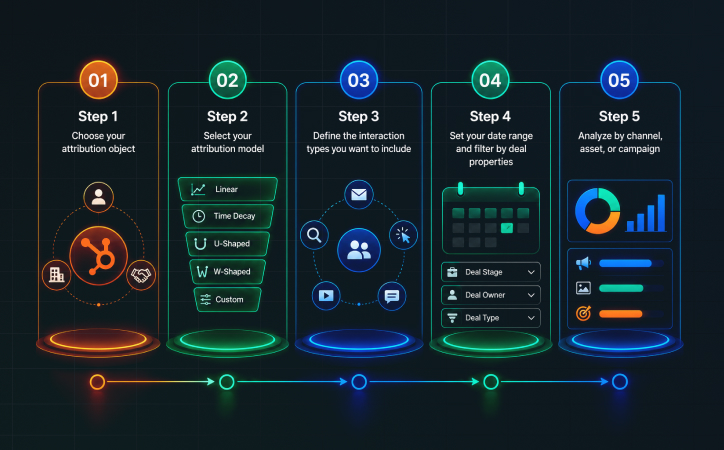
Once the foundation is solid, you can start building attribution reports inside HubSpot’s reporting tools. The process lives under Reports > Attribution in your HubSpot portal (available on Marketing Hub Professional and Enterprise plans).
Here is how to approach the build step by step.
Step 1: Choose your attribution object
HubSpot lets you attribute at the contact level or the deal level. Contact-based attribution shows which touchpoints influenced lead creation. Deal-based attribution connects touchpoints to closed revenue. For revenue-focused teams, deal-level attribution is almost always more valuable because it connects marketing effort directly to money.
Step 2: Select your attribution model.
Based on the model options outlined earlier, choose the one that aligns with your goals for this specific report. Most teams benefit from running two reports in parallel, one linear and one full-path, so they can see both the full picture and the weighted view.
Step 3: Define the interaction types you want to include.
HubSpot lets you select which touchpoint types count in your attribution model. Options include page views, form submissions, meetings booked, emails opened or clicked, and CRM activity. For B2B companies with long sales cycles, including meeting bookings and email interactions, it gives a much richer picture than limiting attribution to website visits alone.
Step 4: Set your date range and filter by deal properties.
You can filter attribution data by deal stage, deal owner, deal amount, or close date. This lets you isolate attribution for specific segments, such as enterprise deals over a certain value, or deals closed by a specific sales team.
Step 5: Analyze by channel, asset, or campaign.
Once the report runs, you can break down attributed revenue by source (organic, paid, email, direct), by specific content assets (which blog posts or landing pages appeared in winning deal journeys), or by campaign. This is where the real insights emerge.After a proper setup and continuous usage of attribution models, the question arises: which metrics to track to know which touchpoint is generating the most conversion impact? Let’s find out.
The Attribution Metrics That Matter Most
Many teams become overwhelmed because attribution reports contain a large amount of data. The key is focusing on metrics that influence business decisions.
Some of the most valuable metrics include:
- Influenced Revenue
Shows how much revenue was impacted by specific campaigns or channels.
- Cost per Influenced Opportunity
Helps determine which activities generate the most qualified pipeline efficiently.
- Revenue by Content Asset
Reveals which content pieces consistently contribute to deal creation and revenue.
- Attribution by Campaign
Provides visibility into campaign effectiveness beyond lead generation.
These are the primary metrics that provide an accurate and honest credit to the touchpoints that have driven most value in the conversion.
Common Attribution Mistakes to Avoid
Even with HubSpot's powerful native tools, teams frequently make mistakes that undermine the quality of their attribution data.
One of the most common is treating attribution as a reporting project instead of a decision-making framework. It should influence: budget allocation, campaign planning, content strategy, channel investment, sales and marketing alignment.
Another frequent mistake is relying on a single attribution model; different models answer different questions. So, using a proper combination of multi-touch models is necessary.
Organizations should also remember that attribution is not perfect. Modern buying journeys include offline conversations, direct messaging, phone calls, etc., that are difficult to track completely. Industry experts continue to point out that important customer interactions often remain invisible in traditional attribution systems.
These are some of the common mistakes HubSpot reps can take care of while or before setting attribution models.
Final Verdict
Multi-touch attribution is no longer a nice-to-have capability for marketing teams. It has become essential for organizations that want a realistic understanding of how revenue is generated.
Buyers rarely convert after a single interaction. They move through complex journeys involving multiple channels, campaigns, and content assets. A well-built attribution model helps uncover those journeys, identify what truly influences the pipeline, and guide smarter investment decisions across the funnel.
HubSpot provides the reporting foundation, but the real value comes from how the platform is configured, connected, and aligned with your revenue strategy. That is where experienced HubSpot partners, like Buldok Marketing, make the difference.
At Buldok Marketing, we help businesses build complete ecosystems through HubSpot 360° services that include CRM implementation, RevOps consulting, marketing automation, reporting, attribution modeling, sales enablement, integrations, and ongoing optimization.
Ready to build a HubSpot attribution model that connects marketing activities directly to pipeline and revenue? Connect with our team to discuss your HubSpot strategy and the insights driving your growth.