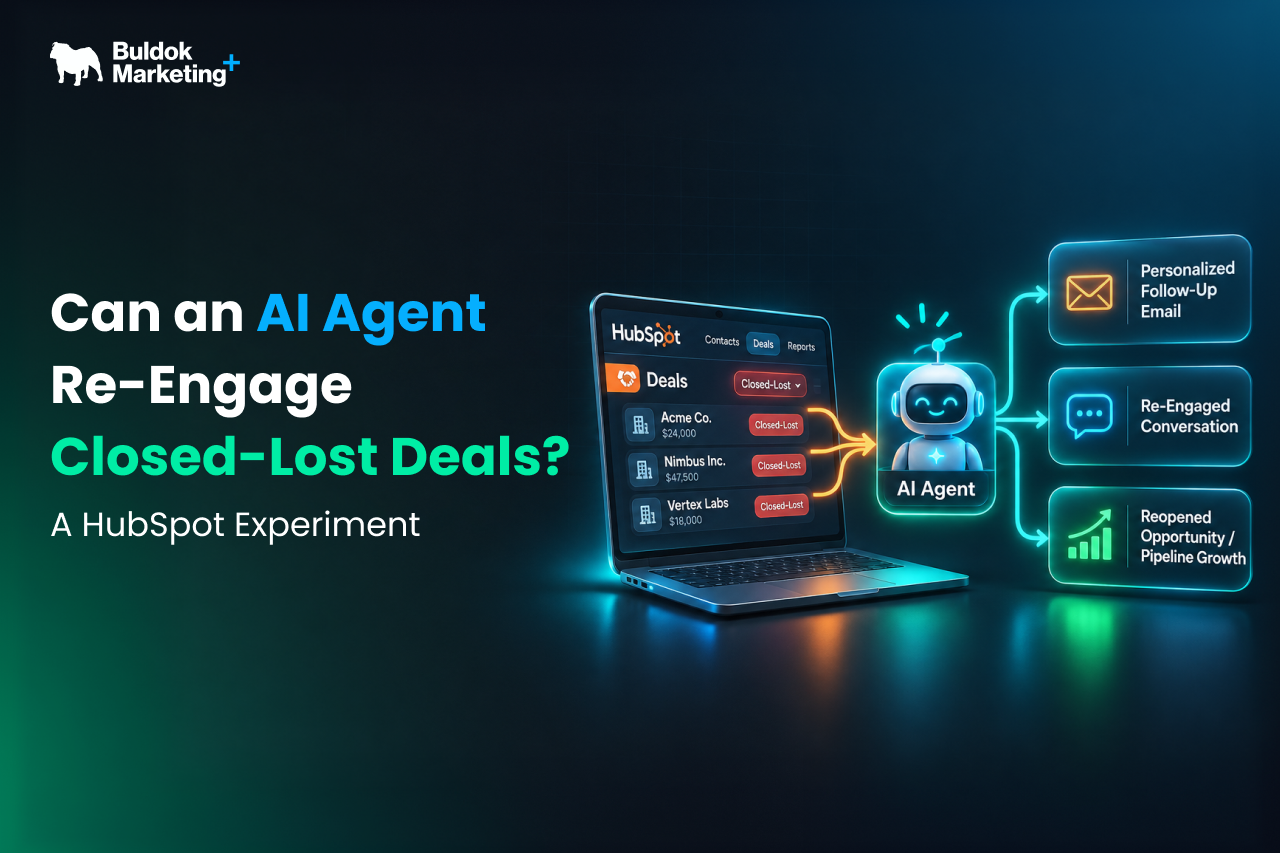
Yes, an AI agent can help re-engage closed-lost deals by reviewing past CRM interactions, understanding previous objections, identifying opportunities worth revisiting, and preparing personalized follow-up messages. However, whether those conversations turn into qualified sales opportunities depends on the prospect's current needs, timing, and the quality of CRM data.
Every sales team has them. Deals that looked promising, went through multiple conversations, and eventually ended up marked as closed-lost in the CRM.
Maybe the prospect didn't have the budget. Maybe the timing wasn't right. Or perhaps they chose another vendor. Whatever the reason, those opportunities often sit untouched in HubSpot while sales representatives focus on finding new prospects.
In this article, we'll explore a practical HubSpot experiment designed to test whether AI-assisted follow-ups can bring these lost opportunities back into the sales pipeline. We'll cover how to set up the AI agent, what data it needs, how to measure its performance, and where human involvement remains essential.
Why Closed-Lost Deals May Still Hold Revenue Potential
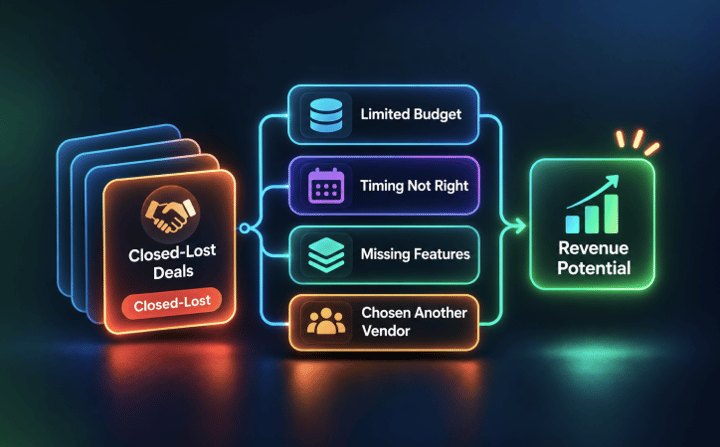 A closed-lost deal doesn't always mean the prospect has permanently lost interest. In B2B sales, purchasing decisions depend on several factors like limited budget, internal delays, missing features, etc., beyond whether a company needs your product or service. When some of these barriers disappear, the closed-lost deal will again show revenue potential.
For example:
A company that postponed its CRM implementation six months ago might now have an approved budget. A prospect who selected a competing platform might be reconsidering that decision.
The challenge is knowing when and how to reconnect.
Sales representatives rarely have time to review hundreds of historical opportunities individually. Even when they do, understanding the context behind each lost deal requires reading old emails, meeting notes, and CRM records. As a result, potentially relevant opportunities may remain buried in the pipeline.
This is where AI-assisted re-engagement becomes interesting. Instead of asking sales representatives to manually review every closed-lost opportunity, an AI agent could help identify which records deserve attention.
Can an AI Agent for Sales Actually Re-Engage Closed-Lost Deals?
Yes, an AI sales agent can help re-engage closed-lost deals by analyzing previous CRM interactions, identifying prospects whose circumstances may have changed, and preparing personalized follow-up messages. When connected to HubSpot and configured with appropriate workflows, it can help sales teams revisit lost opportunities without manually reviewing every deal.
However, there's an important distinction between traditional workflow automation and AI agents.
HubSpot Workflows vs. AI Agents
Traditional HubSpot workflows are useful when the process follows predictable rules.
For example, a workflow can create a task 90 days after a deal is marked closed-lost, provided it meets the enrollment criteria.
But that workflow doesn't necessarily understand why the deal was lost. An AI agent adds another layer by interpreting the context available in the CRM.
|
Traditional HubSpot Workflows |
AI-Assisted Re-Engagement |
|
Follow predefined conditions |
Interpret relevant CRM context |
|
Trigger tasks at scheduled intervals |
Recommend timing based on available information |
|
Use predefined email templates |
Prepare context-specific messages |
|
Route records through preset actions |
Recommend appropriate next steps |
|
Handle predictable processes |
Assist with tasks requiring contextual judgment |
The two approaches work best together. HubSpot workflows can handle eligibility checks, task creation, and record routing, while an AI agent can assist with research, prioritization, and personalized messaging.
The Experiment: Can AI Bring Lost Opportunities Back Into the Pipeline?
Let's design a simple experiment.
Hypothesis:
An AI-assisted process that analyzes closed-lost deal history and prepares personalized follow-ups will generate more qualified re-engagement conversations than the existing follow-up approach, without significantly increasing manual sales effort.
For this proposed experiment, we'll use 100 eligible closed-lost deals from HubSpot.
We'll divide them into two groups:
- Control group: 50 deals handled through the team's existing follow-up process.
- AI-assisted group: 50 deals reviewed by the AI agent, with personalized outreach prepared for sales representative approval.
Both groups should have similar characteristics, including deal age, value, and original loss reasons. Random assignment within those categories helps reduce the risk of one group containing more promising opportunities.
We'll run the initial outreach test for 30 days and continue monitoring qualified opportunities after the outreach period.
The main objective is to understand whether AI can help revive meaningful sales conversations, rather than simply increase email activity.
Note: This is a proposed experiment, not a report of a completed Buldok Marketing test. The sample size, duration, and results are illustrative.
How to Set Up an AI Closed-Lost Deal Re-Engagement Experiment in HubSpot
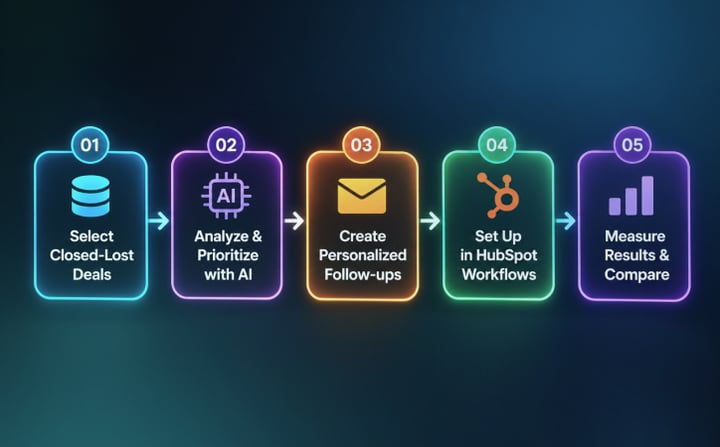 The success of this experiment depends on more than selecting an AI tool. You need reliable CRM data, clear qualification rules, appropriate outreach controls, and a process for passing interested prospects back to sales.
Here's how to structure it:
Step 1: Build a List of Eligible Closed-Lost Deals
In HubSpot, begin by filtering deals using criteria such as:
- Deal stage: Closed Lost
- Close date: Between three and twelve months ago
- Closed-lost reason: Budget, timing, delayed decision, or another potentially temporary obstacle
- Contact history: Previous meaningful sales interaction
- Current status: No active opportunity covering the same requirement
- Outreach eligibility: Valid contact information, appropriate permissions, and no applicable opt-out or suppression
These criteria are starting points rather than universal rules. A six-month-old deal in one industry may still be relevant, while another may already be outdated.
Also check for duplicate contacts, changes in employment, or existing conversations with another member of the same buying team. The cleaner the selection, the more useful the experiment.
This is why preparing your HubSpot CRM for AI automation matters before introducing an agent.
Step 2: Give the AI Agent Relevant Deal Context
Once you've selected eligible deals, the next step is to provide the agent with the information needed to understand them.
This may include:
- Previous meeting notes and call summaries
- Logged email conversations
- Closed-lost reason properties
- Products or services previously discussed
- Recorded objections
- Historical proposals or quotations
- Relevant engagement activity
The agent should only access records and supporting material that your organization has approved for this purpose.
Step 3: Use AI to Prioritize Deals Worth Revisiting
Now that the agent has relevant context, it can help the sales team decide which opportunities to review first.
Rather than treating every closed-lost deal equally, the agent could evaluate factors such as:
- Original loss reason
- Time since the last conversation
- Previous buying intent
- Recent engagement
- CRM data completeness
Based on these factors, the agent could recommend three categories:
|
Priority |
Meaning |
Recommended Action |
|
High Priority |
Strong previous interest and a potentially temporary loss reason |
Prepare personalized outreach |
|
Needs Review |
Some potential, but information is incomplete |
Ask the deal owner to review |
|
Do Not Contact |
Disqualified, suppressed, or otherwise unsuitable |
Exclude from outreach |
These are suggested categories for the experiment, not a built-in HubSpot scoring model.
Step 4: Generate Personalized Re-Engagement Emails
Once high-priority opportunities are identified, the AI agent can prepare follow-up emails for sales review.
The message should acknowledge the previous conversation, refer to a relevant business challenge, and make it easy for the prospect to respond.
The agent can also recommend whether a single follow-up is appropriate or whether the contact would be better served by a longer-term nurture process.
One important rule: During the initial experiment, sales representatives should review AI-generated messages before sending them. This protects existing relationships and allows the team to identify inaccurate references, inappropriate timing, or messages that don't match the company's communication style.
Step 5: Connect the AI Agent to HubSpot Workflows and Sales Handoffs
The final setup involves connecting the qualification process, AI-assisted analysis, and human sales activities.
For example:
- A HubSpot workflow identifies a deal that meets the experiment's eligibility criteria.
- The workflow creates a review task or passes relevant record information to an approved AI process.
- The agent evaluates the available context and recommends a priority.
- For eligible high-priority deals, the agent prepares a follow-up message.
- The assigned sales representative reviews the recommendation and approves or rejects the draft.
- Approved outreach is sent through the configured sales process.
- Replies and follow-up outcomes are recorded in HubSpot.
- Interested prospects are routed to the appropriate sales representative for qualification.
HubSpot's Breeze Prospecting Agent supports AI-assisted prospect research and email drafting, but a complete closed-lost deal recovery process may require additional configuration or integrations.
At Buldok Marketing, our approach to HubSpot AI agent deployment emphasizes preparing reliable data sources, setting clear guardrails, testing agent behavior, and establishing human handoff rules.
These steps are particularly important when an AI agent is interacting with prospects who already have a history with your business.
What Metrics Would Prove the AI Agent Is Working?
Here are the metrics worth tracking to know whether the AI agent is working or not:
- Reply rate: Percentage of contacted prospects who respond
- Positive reply rate: Percentage who express relevant renewed interest
- Meeting booking rate: Percentage who agree to another sales conversation
- Reopened opportunity rate: Percentage who qualify for an active opportunity
- Qualified pipeline generated: Value of newly qualified opportunities attributable to the experiment
- Sales time saved: Reduction in manual research and drafting work
- Unsubscribe or complaint rate: Whether the outreach causes unwanted engagement
For a 30-day pilot, focus on early indicators such as positive replies and qualified meetings. Continue tracking pipeline progression and eventual wins beyond the pilot window, particularly if your sales cycle is long.
And remember that 50 deals per group may not be enough to establish a statistically reliable difference. Treat a small experiment as an initial signal, not definitive proof.
Where Could an AI Agent Fail?
AI-assisted closed-lost deal re-engagement sounds promising, but several things can go wrong. Understanding those limitations before launching the experiment is essential.
1. Incomplete or Outdated CRM Data
Suppose a deal is marked closed-lost, but the reason field simply says "Other."
The agent might attempt to interpret incomplete notes and recommend an inappropriate message.
Without reliable information, AI personalization can quickly become inaccurate.
What to do: Require minimum data quality standards before including a deal in the experiment. Route incomplete records for human review.
2. Misreading the Original Reason for Losing the Deal
Not every closed-lost reason is temporary.
For example, if a prospect needed a feature your product doesn't support, waiting six months won't automatically solve that problem.
The AI agent shouldn't suggest that the limitation has been resolved unless there's verified evidence.
What to do: Exclude permanently disqualified deals and require validation before referencing product improvements or new capabilities.
3. Sending Outreach at the Wrong Time
A technically relevant follow-up can still be poorly timed.
The prospect may have recently declined another conversation, changed roles, or entered an active sales discussion with someone else.
In addition, previous business interactions do not automatically establish permission for new marketing outreach.
What to do: Apply suppression rules, frequency limits, and applicable privacy and electronic marketing requirements, including GDPR and relevant local rules.
4. Confusing Activity With Pipeline Recovery
An AI system might generate hundreds of personalized emails and improve reply rates without creating any real sales opportunities.
That's not necessarily pipeline recovery.
What to do: Connect engagement metrics with qualification outcomes, pipeline value, and sales progression.
5. Giving the Agent Too Much Autonomy
An AI agent could damage a relationship if it makes promises it cannot fulfill.
For example, it might suggest an unapproved discount, misrepresent product capabilities, or tell a prospect that their original implementation concerns have been resolved.
What to do: Define clear boundaries for the agent, require approval for external messages during the pilot, and reserve commercial decisions for authorized employees.
AI Agent vs. Sales Rep: Who Should Own Closed-Lost Deal Re-Engagement?
An AI agent can analyze CRM records faster than a salesperson reviewing them manually.
But that doesn't mean it should own the entire sales relationship.
Sales representatives understand details that may not be captured in HubSpot, including relationship history, decision-making dynamics, and sensitive conversations.
When to trust AI agents:
- Review historical CRM records
- Summarize previous objections
- Identify possible re-engagement triggers
- Draft contextual messages
- Flag positive responses
When to trust Sales rep responsibilities:
- Validate account relevance
- Judge relationship sensitivity
- Approve outreach
- Handle objections and negotiations
- Qualify and manage reopened opportunities
For RevOps teams, this division of responsibilities also creates clearer accountability.
The AI agent assists with repetitive preparation, while sales representatives remain responsible for customer relationships and commercial decisions.
The Verdict: Can AI Agents Recover Closed-Lost Deals?
An AI agent can help re-engage closed-lost deals by analyzing CRM history, identifying opportunities worth revisiting, and preparing personalized follow-ups. However, its ability to recover qualified pipeline depends on data quality, timing, and genuine buyer interest.
The proposed HubSpot experiment aims to measure whether AI-assisted outreach generates more qualified conversations and reopened opportunities while reducing manual sales effort.
If successful, sales teams can expand the approach and refine their qualification rules. If not, the results can help identify gaps in CRM data, targeting, or outreach.
Ultimately, the goal isn't to send more automated emails. It's to turn overlooked opportunities into meaningful sales conversations.
Ready to turn your CRM data into a new sales opportunity? Buldok Marketing can help you evaluate where AI agents make sense, prepare your HubSpot environment, and build practical workflows that support your sales team. Discuss your AI agent deployment requirements today!
FAQs
1. How Long Should You Wait Before Re-Engaging a Closed-Lost Deal?
There's no universal waiting period. A deal lost because of budget constraints might be worth revisiting during the next budgeting cycle, while one lost because of an unavailable product capability should only be reconsidered when the requirement can genuinely be addressed. Use the original loss reason and any agreed follow-up timing to guide your decision.
2. Can HubSpot Breeze AI Automatically Contact Closed-Lost Prospects?
HubSpot's Breeze Prospecting Agent supports AI-assisted outreach, including options for reviewing drafts before sending or allowing automated sending under configured settings. However, a complete closed-lost deal recovery process may require additional workflows or integrations to identify eligible deals and apply custom qualification rules. Feature availability depends on your HubSpot subscription and configuration.
3. Should You Reopen the Original Closed-Lost Deal or Create a New One?
It depends on how your sales pipeline and reporting are structured. If the prospect starts a genuinely new buying process, creating a new opportunity can preserve the accuracy of the original loss and provide a clearer record of the new sales cycle. If the original opportunity is simply being resumed, reopening it may be appropriate under your team's CRM rules. Establish a consistent policy before launching the experiment.
4. How Can You Prevent AI From Contacting the Same Prospect Multiple Times?
Use contact-level suppression checks, duplicate detection, workflow enrollment controls, and outreach frequency limits. Before preparing or sending a message, the process should verify whether the contact has already been approached, has an active opportunity, or has opted out of communication.
5. Is AI-Based Closed-Lost Deal Re-Engagement Suitable for Small B2B Sales Teams?
Yes, but it depends on deal volume and process complexity. A small sales team with hundreds of historical opportunities may benefit from AI-assisted review and message preparation. However, if the business handles only a few highly personalized opportunities each month, a simple HubSpot workflow and manual sales review may be more practical than deploying a dedicated agent.