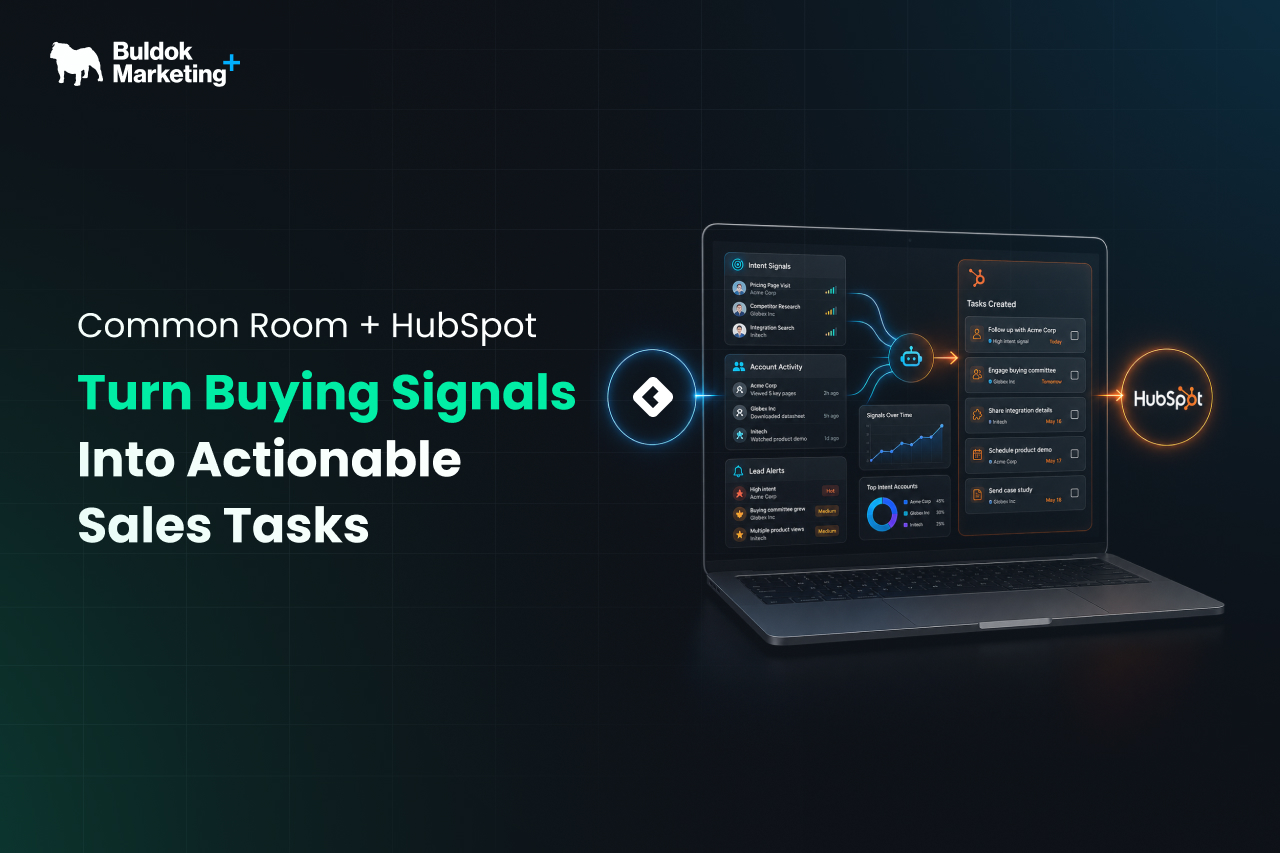
Right now, someone who fits your ideal customer profile (ICP) is showing interest in what you sell. They just changed jobs to an account on your target list. They visited your pricing page twice this week. They asked a question in a community your team runs, or they engaged with a competitor on LinkedIn. Every one of those moments is a reason for a sales rep to reach out to that prospect.
The problem is that almost none of these interactions reach the rep in time.
HubSpot is good at capturing what happens on your own turf. Form fills, email opens, meetings booked, and deal stages. But most buying behavior happens outside your CRM - in the dark funnel. Your HubSpot instance never sees it, so your reps never act on it.
The gap here is not a data gap; the gap is action. The buying signals pile up in one system while the sales team is working on other signals. This is where connecting Common Room and HubSpot changes the landscape. Let's walk through what that looks like and how to set it up so it actually works.
What A Buying Signal Really Is, and Why HubSpot Alone Misses Most of Them
A buying signal is real-world evidence that a person or account might be ready to buy soon.
Signals split into two groups:
- First-party data: When someone downloads a guide, replies to an email, or opens a deal, all this data lives in HubSpot.
- The second group is harder to see, and it is usually where the strongest buying signals hide. Think of engagement in a Slack or community channel, activity on GitHub or X, or product usage that spikes right before a buying decision. These are the signals that HubSpot usually misses.
So why does HubSpot miss most of these signals?
It’s because HubSpot only knows what happens inside your own systems. It records the emails, forms, pages, and deals that touch your properties, and it does that well. But it has no window into the places buyers actually spend their time, like LinkedIn, Slack, review sites, etc. Therefore, that activity never crosses into your HubSpot.
As a result, your reps work off a fraction of the picture, reacting to the few signals that reach them while the strongest, earliest ones stay invisible. Closing that blind spot is the whole reason to add a signal layer like Common Room on top.
Where Does Common Room Fit?
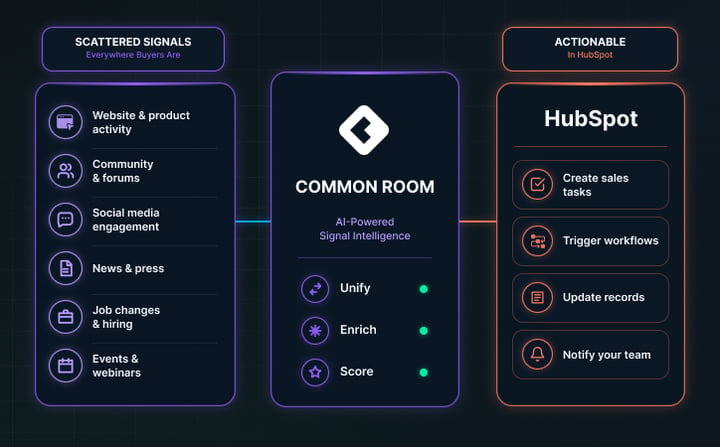
Common Room is an AI Go-To-Market platform that pulls these scattered signals into one place and enriches them with real buyer context. It watches sources HubSpot cannot reach, connects that activity back to real people and accounts, and scores it so you can tell a strong signal from noise.
But before implementing Common Room, keep a note on the task that a tool is only as good as the process behind it. Common Room does not fix a broken handoff or a vague ICP. What it does is give a well-run revenue team a live feed of buying intent that used to be invisible.
The practice built on top of that feed has a name now: signal-based selling, and the whole idea is to sell based on what buyers are actually doing rather than on a static list you built last quarter.
How the Common Room and HubSpot integration Actually Works
The connection between the two systems runs both ways:
From HubSpot into Common Room
- Your contact fields, company details, and deal information sync across.
- Records are matched accurately, contacts by email address and companies by domain.
- Subsidiaries roll up to their parent accounts.
- The result is that Common Room understands your CRM: who owns what, which accounts are already in a deal, and which contacts you already know.
From Common Room back into HubSpot
- Enriched fields and signal activity update your matched contacts and companies.
- Syncs run as often as every 15 minutes for some setups and daily for others.
- When a person shows real intent and meets the rules you set, Common Room can create that contact in HubSpot as a community-qualified lead, so a good prospect who was invisible before now exists as a workable record.
On Top of the Automatic Sync, your Team Gets Manual Controls
- A "Send to HubSpot" button pushes a specific person across when a rep spots something worth acting on.
- An add-to-sequence option drops a contact straight into a HubSpot sequence or workflow.
How to Set Up the Common Room + HubSpot Integration Step-by-step
You do not need an engineer for this. A HubSpot admin can have the core connection running in an afternoon. The order below keeps you from syncing bad data before you have checked it.
- Connect as a HubSpot admin: Authenticate with an account that has App Marketplace access. This is what lets Common Room read from and write to your HubSpot instance.
- Map your fields: Match HubSpot fields to Common Room fields. At a minimum, you map the contact owner and the HubSpot URL. From there, add the contact and company fields you actually want to see on each side.
- Set your inbound rules: Decide what flows from HubSpot into Common Room, and add filter criteria so only the records you care about sync across. This is where you tell the system what a relevant contact or account looks like.
- Set your outbound rules: Decide what flows from Common Room back into HubSpot: which enriched fields update, and the conditions under which a new community-qualified lead gets created.
- Test on a few records first: Before you turn on automatic sync, push a handful of individual contacts across and check that they land correctly, with the right owner and the right fields filled in.
- Validate, then switch on auto-sync: Once the test records look right in the target system, enable the automatic sync and choose your cadence, from every 15 minutes up to daily.
A good rule here is to start small and confirm each step before moving to the next. It is far easier to fix a mapping on ten records than to clean up ten thousand.
Common Mistakes to Avoid While Integrating Both Tools
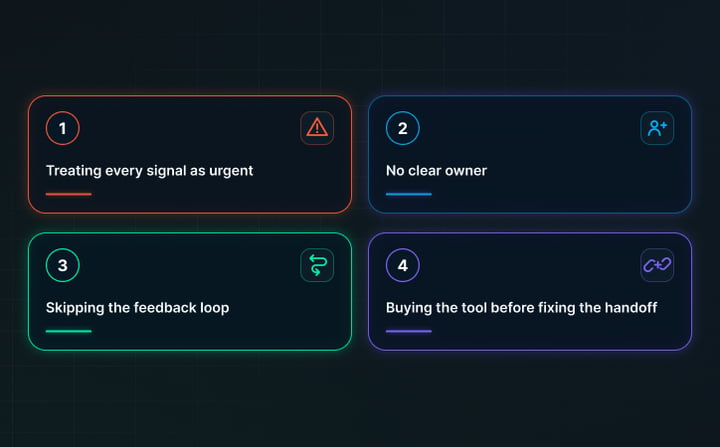
A handful of errors show up again and again:
- Treating every signal as urgent: This is the biggest one. It floods reps with tasks and teaches them to tune the whole thing out.
- No clear owner: Signals arrive, and nobody moves, because it was never anyone's job to work them.
- Skipping the feedback loop: If you never review which signals actually turned into pipeline, your scoring never improves, and the noise never drops.
- Buying the tool before fixing the handoff: This is the mistake Buldok sees most. A better signal feed poured onto a broken marketing-to-sales handoff just produces broken outcomes faster.
How To Decide Which Signals Deserve a Human
Not every signal earns a rep's time, and deciding that upfront is the whole game.
Sort your signals by intent before you wire anything up. For instance, a high-intent signal from a great-fit account should create a task for a person, and a softer signal belongs in automated nurture until it strengthens.
If you skip this step, you either bury reps in low-value tasks or you let strong signals drain away into a nurture track no one is watching.
A simple way to think about it:
- High intent plus strong fit: create a rep task now.
- High intent plus weak fit: hold and watch, or route to marketing.
- Low intent plus strong fit: enroll in nurture and wait for the next signal.
- Low intent plus weak fit: log it, do nothing.
In addition to that, map an owner and a response time to each task type as well. A task with no owner and no clock attached is a task that quietly dies. When you set these rules first, the automation works for your team instead of drowning it.
How to Know the Setup Is Working or Not
Turning signals into tasks only matters if it moves the numbers you care about.
Watch a few metrics from the start so you can tell whether the system is helping or just making noise:
- Speed to action: how long between a signal firing and a rep working the task. This should drop.
- Signal-to-meeting rate: the share of signal-driven tasks that turn into real conversations. This tells you if your fit rules are tight enough.
- Pipeline sourced from signals: the deals that started life as a Common Room signal. This is the number that proves the investment.
- Task quality feedback: ask reps which signals feel worth their time. Their answers are your best input for tuning your scoring.
Review these on a regular cadence and adjust your rules. Over time, you tighten the criteria, cut the signals that never convert, and lean harder into the ones that do. That feedback loop is what separates a setup that improves each quarter from one that slowly gets ignored.
Final Verdict: Turning Signals into Pipelines
The real win here is not more data. You already have more than you can use. The win is faster, smarter action.
Connecting Common Room and HubSpot closes the gap between a buyer showing intent and a rep doing something about it, so the moments that used to slip past now show up as tasks your team can work.
That only happens when the process underneath is sound, with clear owners, clear rules, and a habit of tuning as you learn. The integration is the easy part. The discipline behind it is what turns buying signals into real pipeline.
If you want help designing that revenue system and getting the HubSpot setup right so your signals turn into real pipeline, Buldok Marketing is here to help. Connect with us today to discuss your requirements further.